Variables
A variable stores a value. The value can be taken from a SIP message or be set by the user. For example, in a fully established dialog the client must remember the To tag. There is a set of predefined variables ([local_ip], [local_port], [peer_tag_param], ..., also known as keywords) and the user defined variables. System variables are set automatically from the configuration and are used without a ‘$’ sign. User variables are set explicitly and are used with ‘$’. They are not global: they belong to the dialog they are defined in, so each call has its own value of the same variable. Variables are created in the Variables tab.
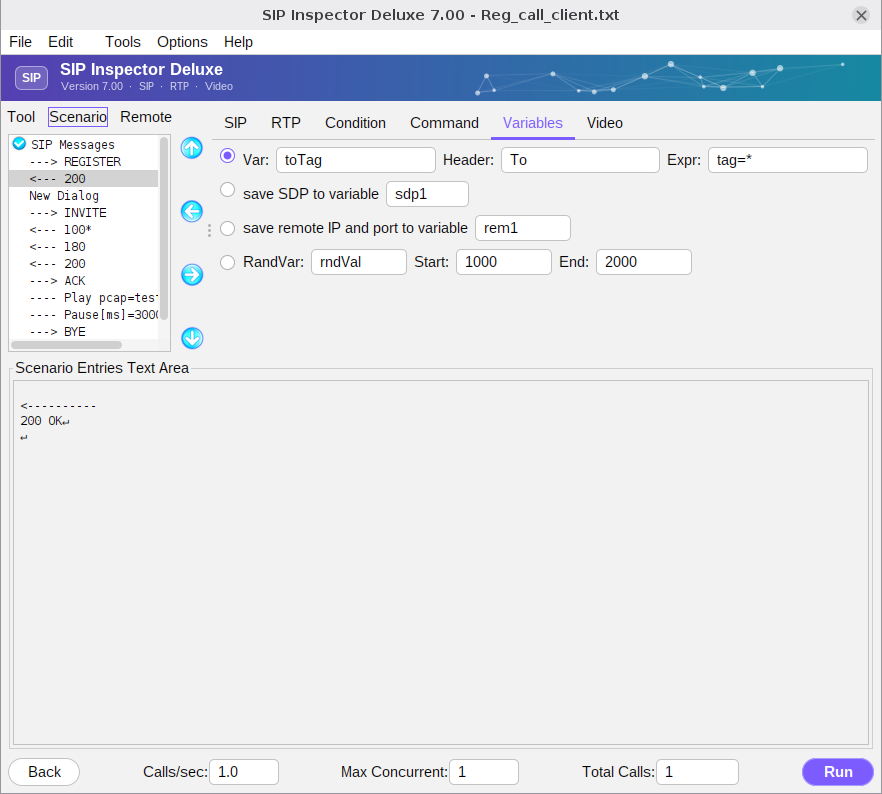
| Field | Meaning |
|---|---|
| Var | The name of the variable, for example ‘toTag’. Later in the scenario the value is used as [$toTag]. The ‘$’ tells SIP Inspector that this is a user variable and not a keyword. |
| Header | The SIP header to take the data from. If left empty the search starts at the beginning of the message and stops at the first match. ‘startline’ stands for the first line of a message, which has no header name. |
| Expr | A ‘star-matching’ expression. Whatever the * matches is stored in the variable. It is much simpler than a regular expression. |
| save SDP to variable | Stores the whole SDP body in a variable. |
| save remote IP and port to variable | Stores the IP address and port of the remote end in the form IP:port. |
| RandVar | Gives the variable a random value between Start and End (both included). |
The logic of the star pattern: (a) find the text before the *, find the text after it, and return what is between; (b) if there is nothing before the *, return what comes before the text after it; (c) if there is nothing after the *, return what comes after the text before it. Suppose these pieces must be taken from the header
Contact: Zarko Coklin user <sip:112@192.168.1.201:5060;transport=udp;rinstance=124_test_32>| Var | Header | Expression | Result | Comment |
|---|---|---|---|---|
var0 | Contact | "*" | Zarko Coklin user <sip:112@192.168.1.201:5060;transport=udp;rinstance=124_test_32> | The whole header value. |
var1 | Contact | "Zarko Coklin user *" | <sip:112@192.168.1.201:5060;transport=udp;rinstance=124_test_32> | A * at the end gets the rest. |
var2 | "Contact" | "* Coklin" | Zarko | A * at the beginning gets the first part. The header name is in quotes. |
var3 | "Contact:" | " * " | Coklin | The value starts with "Zarko" and not with " Zarko", so the first match of " * " is the one around "Coklin". |
var4 | Contact: | "<sip:*@" | 112 | A convenient way to get a user name. |
var5 | - | "=500" | 500 | No header: a number is assigned. In the Variables tab only integers can be assigned; the Set variable command also does sums. |
A particular instance of a header can be addressed, which is useful for Record-Route: Record-Route-1:, Record-Route-2: and so on. See Record_route_client.txt.