Build, run and prove any SIP call flow
SIP Inspector builds SIP scenarios in a friendly GUI, runs them once to troubleshoot or at thousands of calls per second to load test, from the command line or over REST, and tells you, with reports your CI understands, whether the other side got it right.
Free for 5 days: all Pro features, no payment card · or try the live demo in your browser
Windows, Linux and macOS · Java 17 · one-time license per computer
10.0.0.5:5060PBX
10.0.0.9:5060
Everything a SIP test needs, in one tool
Troubleshooting, interoperability, load testing and test automation. From the first INVITE to a green CI build.
Learn it in minutes
Build a scenario entry by entry in the GUI. The file is plain text that reads like a call flow (---> INVITE, <--- 200), not pages of XML.
GUI and command line, one file
The scenario you tried in the GUI runs unattended from a script, a CI job or a service. Every field of the GUI is a command line option.
Read more →From Wireshark to a test
Trace to Scenario turns a pcap or pcapng capture into a scenario, together with the RTP the endpoint sent. In the GUI or with -pcap2scen.
Results you can prove
Assertions, a CI gate on ASR, response times and MOS, and HTML, CSV, JUnit XML and JSON reports. Exit codes 0, 1 and 2 for scripts.
Read more →See every call
A live ladder diagram of the calls. The first call that went wrong is kept for the whole run, and is in the HTML report too.
Read more →Catches bad messages
Every message sent and received is checked against RFC 3261, RFC 4566 and RFC 3264. Validate Scenario finds mistakes before you run.
Read more →Real media
RTP from pcap files, live speech through your microphone (G.711, G.729), SRTP, digits for IVR testing, and H.264 video that is decoded and shown.
Read more →Remote control over REST
-api opens an HTTP API: watch a run, change its rate, read Prometheus metrics, stop it. A control page runs in any browser.
Every transport
UDP, TCP, TLS, WebSocket and secure WebSocket, IPv4 and IPv6, DNS SRV, DSCP marking (QoS) of SIP and RTP. Tools for keys and self-signed certificates are built in.
Read more →Built for people who live in SIP traces
Real screens of SIP Inspector 7. Click a picture to see it full size.
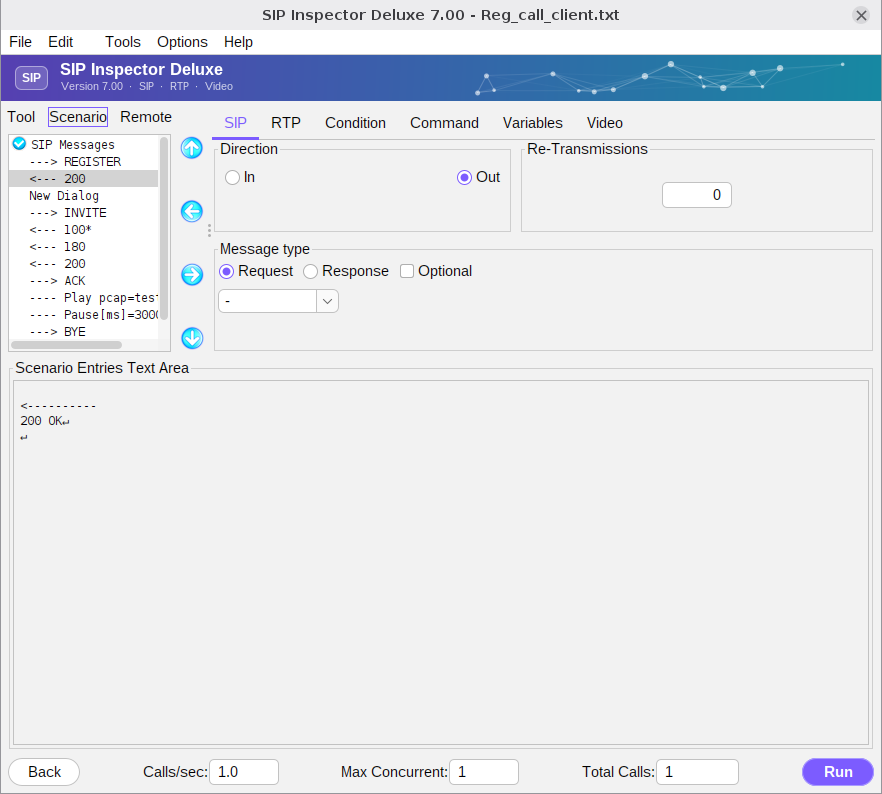
Build call flows without writing code
Every entry of a scenario is a SIP message, a pause, a command, a condition or a variable. Pick them on the tabs; the text area shows the exact message that goes out.
- Keywords like [local_ip] and [cseq] keep scenarios free of hard-coded values
- Multiple dialogs in one scenario: register, then call
- Comments in the scenario file are kept when you edit and save
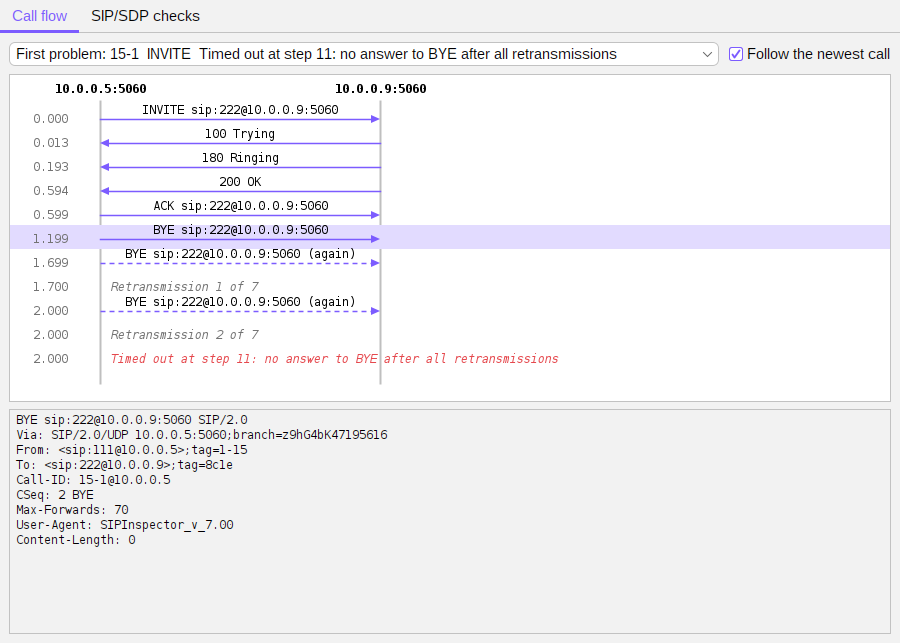
Watch the call, step by step
The messages of a call as a ladder diagram, live while the scenario runs. The first call that did not reach the end is kept for the whole run.
- Retransmissions and time outs explained in plain words
- The message you select is shown in full below the ladder
- The same diagram is in the HTML report
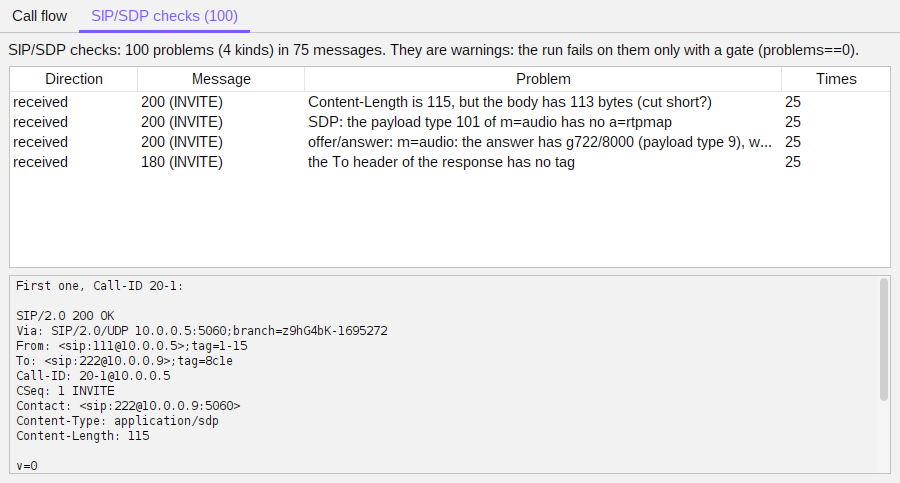
Find what the other side will reject
Every message sent and received is checked against RFC 3261, RFC 4566 and the offer/answer rules of RFC 3264.
- Problems are listed per message, with the rule they break
- A gate
problems==0fails a run with bad messages - Validate Scenario checks a scenario before it runs
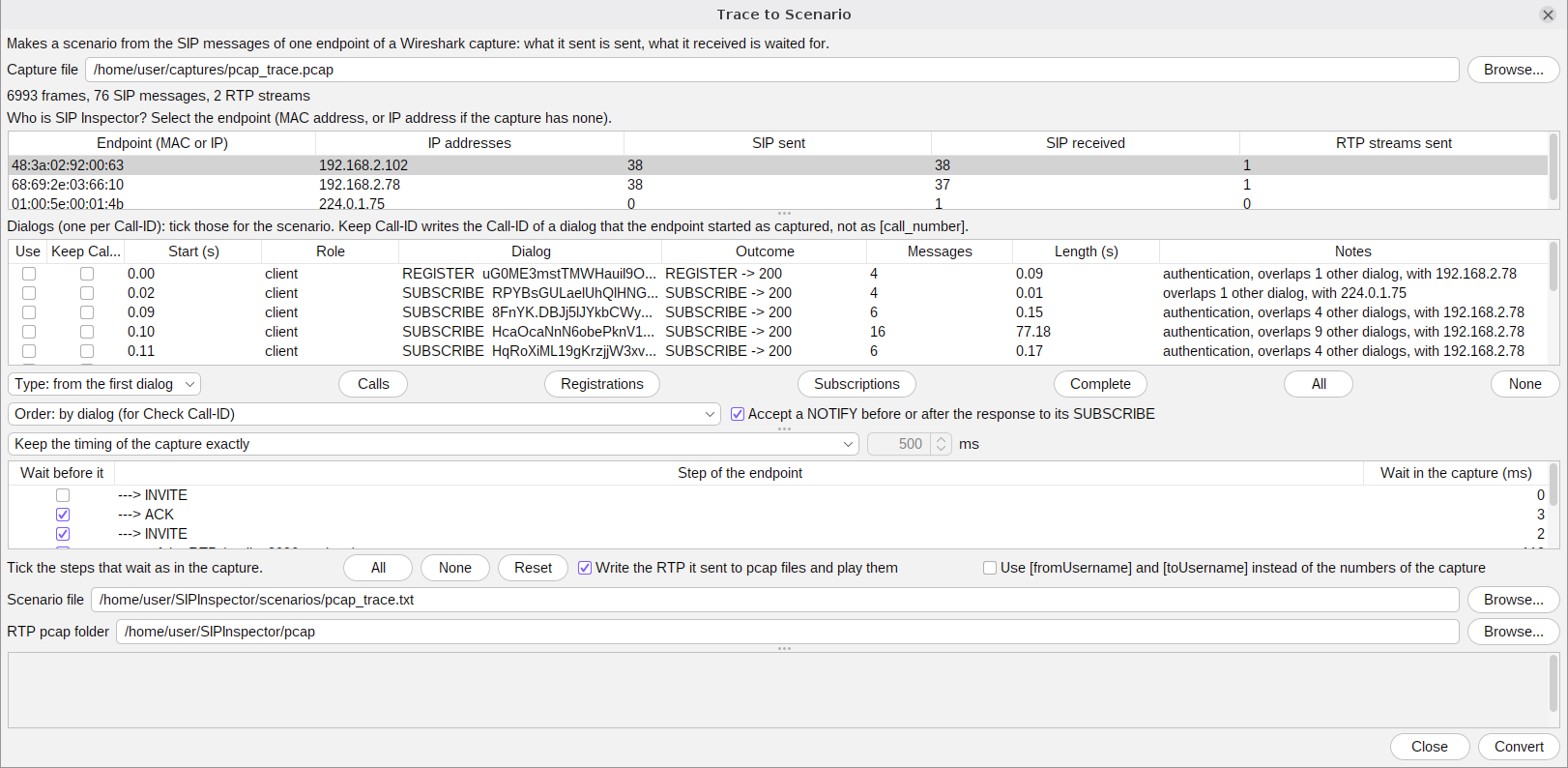
Turn a capture into a test
Open a Wireshark capture, pick the endpoint SIP Inspector takes the place of and the dialogs you want. The program writes the scenario and the RTP the endpoint sent.
- pcap and pcapng, signalling and RTP
- Keep the timing of the capture, or play it as fast as possible
- Also on the command line:
-pcap2scen
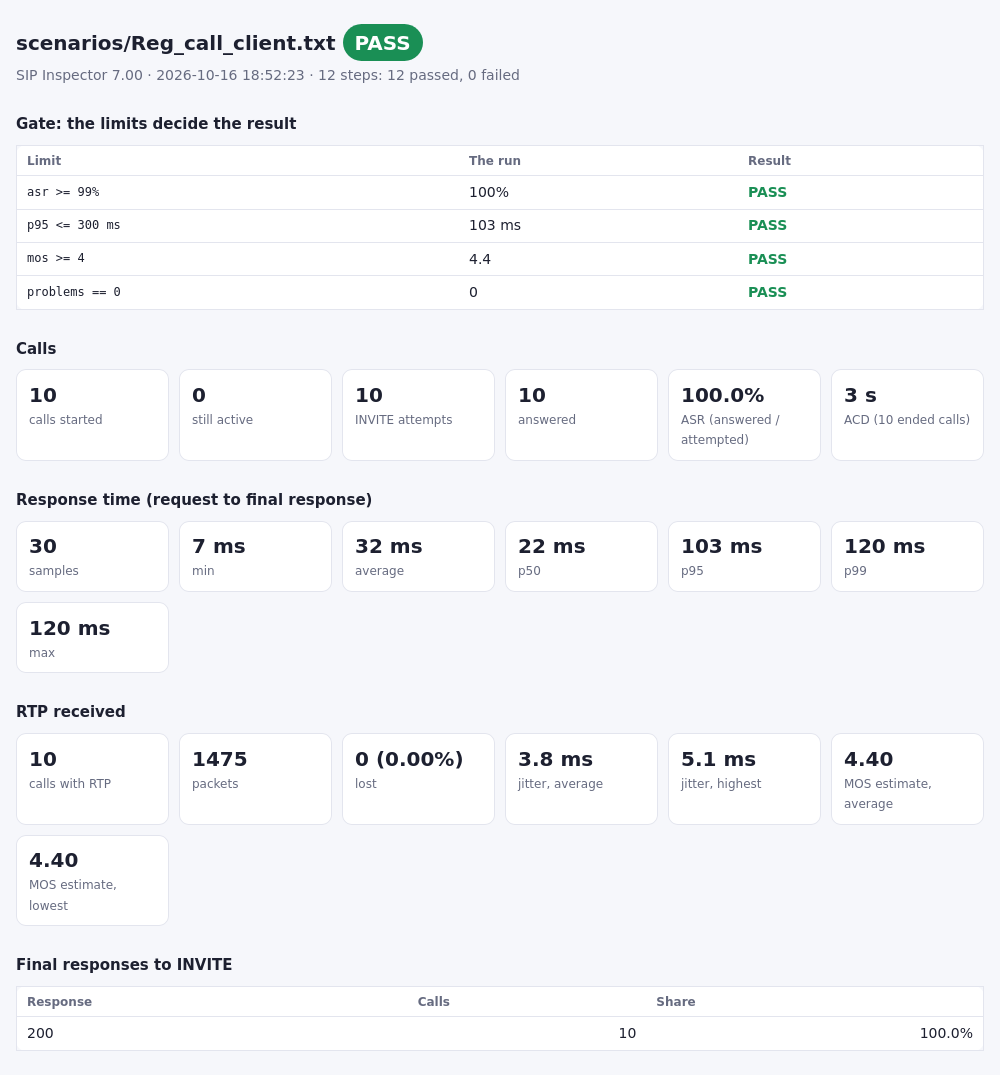
Reports that answer "did it work?"
Every run can write HTML, CSV, JUnit XML and JSON reports. The gate table shows which limit held and which did not.
- ASR, ACD and the final responses
- Response times: p50, p95 and p99
- RTP quality: loss, jitter and MOS
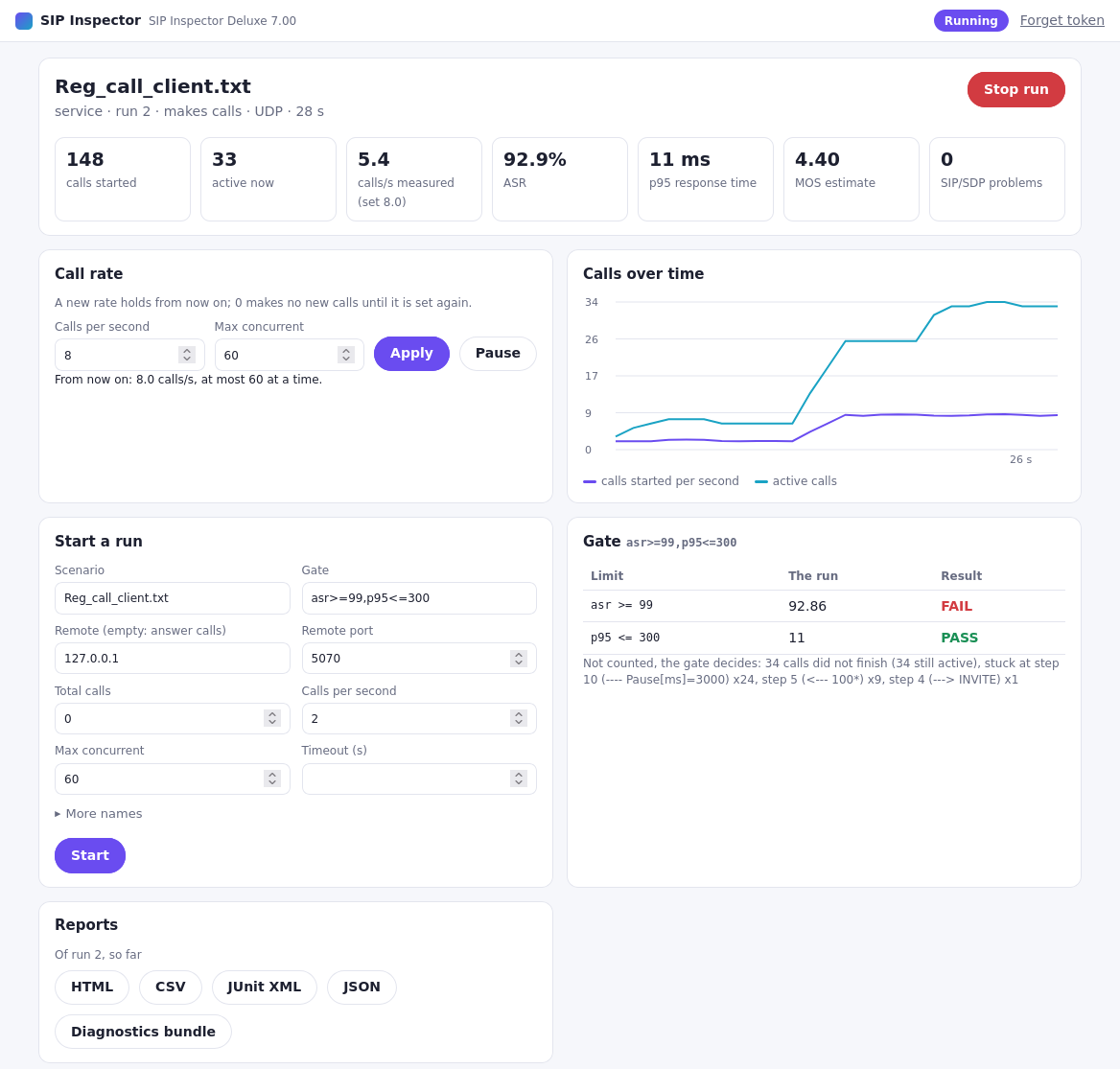
Steer a run from any browser
A run started with -api serves a control page: live numbers, a chart of the calls, and buttons for the rate, Stop, new runs and the reports.
- The same numbers for Prometheus and Grafana
- Service mode takes run after run over REST
- A token keeps the API private
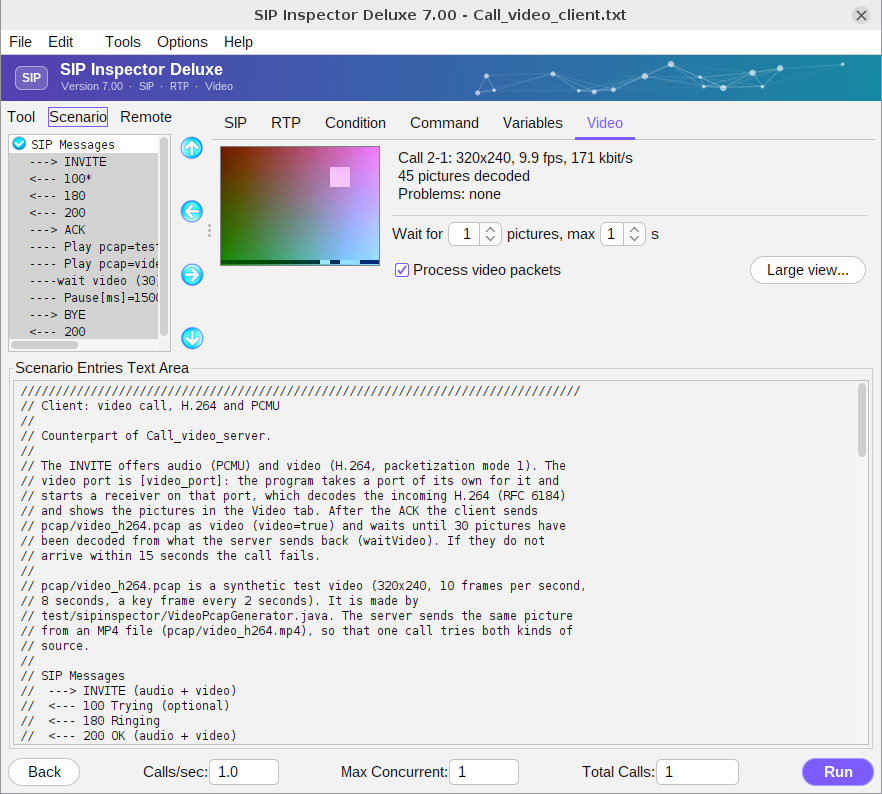
H.264 video, sent and decoded
Offer, send and receive H.264 video from a pcap or an MP4 file. Incoming video is decoded and shown, and a scenario can wait for a number of pictures.
- Video tab, its own window, and in the scenario screen
- Audio and video in the same call
- Test video paths of SBCs and media servers
Made for scripts, CI and services
Everything in the GUI works on the command line, so a scenario that was tried by hand becomes a regression test in minutes.
- Exit codes: 0 passed, 1 failed, 2 could not start
-gate asr>=99,p95<=300,mos>=4lets the numbers decide- JUnit XML for Jenkins and GitLab, JSON for your own tools
- Service mode:
POST /runstarts the next test
$ SIPInspDlx -lip 10.0.0.5 -rip 10.0.0.9 -fs scenarios/my_call_with_asserts.txt -tc 1 -np -junit results/sip.xml -gate asr>=99,mos>=4.0,loss<=5
Metrics: steps 21 (21 passed, 0 failed), calls started 1, still active 0
  calls: 1 attempted, 1 answered, ASR 100.0%, ACD 3 s, final responses 200 x1
  response time: samples 3, min 4 ms, avg 29 ms, p50 21 ms, p95 62 ms, p99 62 ms, max 62 ms
  rtp: 1 call, packets 133, lost 0 (0.00%), jitter avg 3.5 ms max 4.7 ms, MOS avg 4.40 min 4.40
  sip/sdp checks: no problems in 9 messages
Result: PASS
Gate: asr 100% >= 99 PASS, mos 4.4 >= 4 PASS, loss 0% <= 5 PASS
$ echo $?
0
From one call to a load test
The scenario that reproduces one call is also your load test: set the calls per second and the concurrent calls, and SIP Inspector becomes a SIP call generator with real RTP.
- Measured with version 7: 22,000 calls per second, and 17,500 calls with two-way audio, on one desktop PC
- Change the rate live over REST; metrics for Prometheus and Grafana
- Pass or fail on ASR, p95 response time and MOS
SIP Inspector and SIPp
SIPp is the best known free SIP test tool. Here is where SIP Inspector goes further.
| SIP Inspector 7 | SIPp | |
|---|---|---|
| Graphical scenario editor | ✓ Yes | ✕ No, command line only |
| Scenario files | Plain text that reads like a call flow | XML |
| Windows | ✓ Native program | Through Cygwin |
| Wireshark capture to scenario | ✓ Built in (GUI and -pcap2scen) | Not built in |
| Ladder diagram of the calls | ✓ Live and in the HTML report | Not built in |
| RFC checks of every message | ✓ RFC 3261, 4566 and 3264 | Not built in |
| Reports | HTML, CSV, JUnit XML, JSON | Statistics files and logs |
| Pass or fail on ASR, response time, MOS | ✓ -gate with limits | Exit code from failed calls |
From the public documentation of SIPp (github.com/SIPp/sipp and sipp.readthedocs.io), October 2026. More about the comparison →
Video
H.264 from pcap or MP4, decoded and shown.
Trace to Scenario
A Wireshark capture becomes a scenario.
Run reports and CI
HTML, CSV, JUnit XML, JSON, assertions and a gate.
Control over REST
An HTTP API, a browser page and a service mode.
Call flow
A ladder diagram of the calls, live and in reports.
SIP and SDP checks
Every message checked against the RFCs.
Validate Scenario
Finds mistakes in a scenario before it runs.
Values files
Named columns, .csv files, each row once.
New commands
Wait RTP, Wait video and Set variable.
Diagnostics bundle
One zip to send with a support question.
New look
Dark and light themes.
Writing scenarios with Claude
A skill that writes scenarios for you.
Ready to inspect your SIP?
Download SIP Inspector and try it free for 5 days with all Pro features. Buy a license for your computer when you are ready.