Command Line Interface
On Windows the executable for the command line interface is SIPInspDlxCLI.exe; on other operating systems it is SIPInspDlx when it is started with options. In the examples below the program is called SIPInspDlx. SIPInspDlx -h prints all options.
The CLI mode runs a scenario that was made in the GUI (or by hand, or by Trace to Scenario) without any window. Everything that the GUI takes from its fields is given with an option: the local and the remote address, the From and To users, the authentication, the speed of the calls and so on. The options replace the same keywords as the GUI fields do.
| Option | What it does | Notes |
|---|---|---|
-fs <path> | Scenario file | The scenario to run. |
-fv <path> | Values file | Values replace the [fieldN] keywords, one row for every new call. |
-fvo | Use each row of the values file once | One call per row; the run ends after the last row, also with -tc 0. |
-lip <IP address> | Local IP address | Replaces [local_ip]. |
-lp <port> | Local SIP port, 5060 by default | Replaces [local_port]. |
-rip <IP address> | Remote IP address | Where SIP messages are sent to. Replaces [remote_ip]. |
-rp <port> | Remote SIP port, 5060 by default | Replaces [remote_port]. |
-lrtp <port> | Local RTP port, 6000 by default | Replaces [media_port]. It grows by 2 for every new call. |
-rtp_ip <IP address> | Remote RTP IP address | Where an unconditional RTP stream is sent (see Remote RTP). |
-rtp_port <port> | Remote RTP port | Port of an unconditional RTP stream. |
-t <protocol> | Transport: UDP (default), TCP, WS, WSS or TLS | Replaces [transport]. |
-ip <(v4|v6)> | IP version, v4 by default | Replaces [IP_ver]. |
-rpath <path> | Remote path for WS and WSS | The path on the remote server. Empty by default. |
-uf <user> | From user name | Replaces [fromUsername]. |
-ut <user> | To user name | Replaces [toUsername]. |
-au <username> | Authentication user name | Replaces [authUsername]. |
-ap <password> | Authentication password | Replaces [authPassword]. |
-cps <float> | Call generation speed, calls per second | 0.1 is one call every 10 seconds. |
-mc <integer> | Maximum concurrent calls | 0 means unlimited. |
-tc <integer> | Total number of calls generated | 0 means unlimited: the scenario runs until it is stopped. |
-to <sec> | Maximum time for the scenario to complete | A scenario finishes when its end is reached. After this time it is terminated. |
-noCID | Do not check Call-ID | One call gets every message, in the order of the scenario. See Don't check Call-ID. |
-np | Do not print the scenario progress | Use it for a server that runs in the background, or when the output goes to a file. |
-log | Log SIP messages | The messages are written to a file in the Logs folder. |
-logScen | Log the scenario progress | The progress table is written to a file in the Logs folder. |
-d <level> | Program log level: ERROR, WARN, DEBUG, VERBOSE or OFF | Messages go to SIPInspector.log (INFO and FINE are accepted for DEBUG and VERBOSE). |
-pv | Decode the received video | Off by default: the video is then received and dropped, and Wait video does not wait. With -pv the pictures are decoded and counted. |
-nv | Do not decode the received video (the default) | Video is still offered and sent. |
-cTLS | Check the client's certificate | For a server that uses TLS or WSS. |
-addCrt <pk> <cp> | Add own certificate (server) | pk is the private key path, cp the certificate path. |
-addTCA <cp> | Add a trusted certificate or CA | cp is the certificate path. |
-genKeys <a> <len> | Create a public and a private key | a is RSA, DSA, DH or EC. The keys go to the security folder. |
-genCrt <k1> <k2> <DN> <N> | Create a self-signed certificate | k1 private key, k2 public key, DN the domain or IP address, N the days it is valid. |
-junit <file> | Write a JUnit XML report | Every scenario step is a test case; a step with an unexpected message or a failed assertion is a failure. For CI servers. |
-report <file> | Write a CSV report | The run totals (calls, ASR, ACD, response times, RTP quality) and every step with PASS or FAIL. |
-html <file> | Write an HTML report | A page with the verdict, the key numbers and every step. See Assertions and run reports. |
-json <file> | Write the result as JSON | The verdict and why, the gate, the numbers of the run and every step, for tools that read the result. |
-gate <limits> | CI gate: limits on the whole run | For example asr>=99,p95<=300,mos>=4.0. With a gate the limits alone decide the result. See The CI gate. |
-api <port> | Open the control API on this port | Other programs watch and steer the run over HTTP. Without -fs the program is a service that waits for runs. See The control API. |
-apiHost <address> | Address the API listens on | Default 127.0.0.1: only this computer. 0.0.0.0 opens it to the network. |
-apiToken <token> | The token of the API | At least 8 characters. Without it a random token is made and printed at the start. |
-apiKeep <sec> | Keep the API open after the end | So that the final result can be read; a POST /stop closes it sooner. |
-diag <file.zip> | Write the diagnostics bundle | When the run ended: the settings, the scenario, the logs, the reports and the call flows in one zip, passwords masked. Without -fs and -api it is written at once. See The diagnostics bundle. |
-noChecks | Do not check the messages | The SIP/SDP checks are on by default; they only warn. See SIP and SDP checks. |
-pcap2scen <capture> | Convert a capture into a scenario | A command of its own, see Trace to Scenario. -pcap2scen -h lists its options. |
-m | Print the Machine-ID | |
-sn <SN> | Register the serial number | |
-v | Print the version | |
-h | Print the help |
Exit codes. The CLI mode ends with an exit code that a script can test: 0 - the run passed; 1 - the run failed (without a gate: an unexpected message, a failed assertion, a call that did not finish, a time out; with a gate: a limit of the gate); 2 - the run could not be started: the command line is wrong (an unknown option, a value or a gate that cannot be read), the socket or the scenario file could not be opened, or the program is not registered on this computer.
Metrics. At the end of a run the CLI prints the numbers of the run: the steps that passed and failed, the calls (INVITE attempts, answered calls, ASR, ACD and the final responses), the response times and the quality of the RTP that came in. A report that cannot be written is logged; it never changes the exit code. A CI job, and what a call of 3 seconds with assertions printed:
SIPInspDlx -lip 10.0.0.5 -rip 10.0.0.9 -fs scenarios/my_call_with_asserts.txt -tc 1 -np \
           -junit results/sip.xml -report results/sip.csv -html results/sip.html
Metrics: steps 21 (21 passed, 0 failed), calls started 1, still active 0
  calls: 1 attempted, 1 answered, ASR 100.0%, ACD 3 s, final responses 200 x1
  response time: samples 3, min 4 ms, avg 29 ms, p50 21 ms, p95 62 ms, p99 62 ms, max 62 ms
  rtp: 1 call, packets 133, lost 0 (0.00%), jitter avg 3.5 ms max 4.7 ms, MOS avg 4.40 min 4.40
  sip/sdp checks: no problems in 9 messages
The CI gate
Without a gate a run passes only when every step went as expected, every assertion held and every call reached the end of the scenario. That is right for a functional test. In a load test a few failed calls are normal; what counts are the numbers of the whole run. A gate sets limits on them, and with -gate the limits alone decide the result and the exit code. Failed steps and calls are still in the reports, as notes.
| Name | The number |
|---|---|
asr | Answered calls / INVITE attempts, in percent |
acd | Average length of the answered calls that ended, in seconds |
attempts, answered | INVITE attempts, answered calls |
unfinished, failedsteps | Calls that did not reach the end of the scenario; steps with unexpected messages |
avg, p50, p95, p99, max | Response times (request to final response), in ms |
packets, loss | RTP packets received; lost RTP packets in percent |
jitter, jittermax | Average and highest RTP jitter, in ms |
mos, mosmin | Average and lowest estimated MOS |
problems | SIP/SDP problems the checks found in the messages (problems==0: a run passes only with clean messages) |
A limit is a name, an operator (<, <=, >, >=, ==) and a number, separated by commas. A number that the run could not measure, for example the MOS when no RTP came, fails its limit: a gate that checks nothing cannot let a run pass. A gate that cannot be read stops the program with exit code 2 before any call is made. In the JUnit report every limit is a test case, and only the limits that do not hold are failures. What a call printed whose assertion (rtp mos >= 4.6) failed, with a gate that held:
SIPInspDlx -lip 10.0.0.5 -rip 10.0.0.9 -fs scenarios/my_call_with_asserts.txt -tc 1 -np -gate asr>=99,mos>=4.0,loss<=5
Result: PASS
Gate: asr 100% >= 99 PASS, mos 4.4 >= 4 PASS, loss 0% <= 5 PASS
Not counted, the gate decides: 1 step got unexpected messages; 1 call did not finish (1 dropped by an error),
  stuck at step 16 (---- assert rtp mos >= 4.6) x1
The control API
This section and the next list the requests; the chapter The REST API step by step shows them at work, with what every command printed.
With -api <port> a CLI run opens a small web server, and other programs watch and steer the run over HTTP while it goes on: a dashboard such as Grafana charts the ASR, the response times and the MOS live, a script stops a run early when the numbers go wrong, and a test can raise or lower the call rate without starting again. Nothing has to be installed: the server is part of Java.
| Request | What it does |
|---|---|
GET /status | Running or finished, the role, the calls started and active, the rate set and measured, and after the end the result, how the run ended and the exit code |
GET /metrics | The numbers of the run now, as the JSON of -json; ?format=prometheus gives them as Prometheus text |
GET /report | The report of the run so far: ?format=html (the default), csv, junit or json |
PUT /rate | A new rate from now on: {"cps": 20}, {"maxConcurrent": 50} or both (or ?cps=20). cps 0 makes no new calls until the rate is set again |
POST /stop | Ends the run like Ctrl-C: the reports are written as at a normal end. After the end it closes the API |
GET /ui | The control page for a web browser (see The control page in a web browser); the page needs no token, every request it makes does |
GET / | The list of the requests |
Safe by default. The API listens on 127.0.0.1, so only programs on the same computer reach it; -apiHost 0.0.0.0 opens it to the network. Every request must give the token, as Authorization: Bearer <token> or X-API-Token: <token>; a request without it gets 401. No request names a file. The API is opened only for a run that was started: a port that is in use stops the program with exit code 2 before any call is made. Only a client has a rate to change; a server (without -rip) answers PUT /rate with 409.
The result of a stopped run. Without a gate a run that is stopped, by Ctrl-C, by a time out or by POST /stop, did not finish and fails (exit code 1). With -gate the limits decide, so a load test without an end of its own (-tc 0) is stopped over the API and judged by its numbers. A run that starts at 100 calls a second, is raised by hand to 500 and then 1000, has its numbers read and is stopped:
SIPInspDlx -lip 10.0.0.5 -rip 10.0.0.9 -fs scenarios/Reg_client.txt -cps 100 -tc 0 -np \
           -api 8080 -apiToken s3cret-token -apiKeep 60 -gate failedsteps<=10,p95<=300 -json run.json

curl -H "Authorization: Bearer s3cret-token" http://127.0.0.1:8080/status
curl -H "Authorization: Bearer s3cret-token" -X PUT -d '{"cps": 500}' http://127.0.0.1:8080/rate
curl -H "Authorization: Bearer s3cret-token" -X PUT -d '{"cps": 1000}' http://127.0.0.1:8080/rate
curl -H "Authorization: Bearer s3cret-token" "http://127.0.0.1:8080/metrics?format=prometheus"
curl -H "Authorization: Bearer s3cret-token" -X POST http://127.0.0.1:8080/stop
Prometheus reads /metrics?format=prometheus directly; its names are the names of the CSV report, for example sipinspector_calls_asrPercent, sipinspector_responseTime_p95Ms, sipinspector_rtp_mosAvg, and sipinspector_running is 1 while the run goes on. The bearer token goes in the authorization part of the scrape job.
The service: runs on request
Started with -api and without -fs, the program makes no run of its own: it is a service. It waits, and every POST /run makes one run. When the run is over the service goes back to the settings of its command line and waits for the next one. A lab computer then keeps one SIP Inspector running, and a script, a CI job or a web page sends it test after test: a regression suite of 40 scenarios with a JUnit report each, both ends of a call driven from one place (the answering service first, then the calling one), a test that a developer starts with one command, or the same scenario with more and more calls until the gate fails.
| Request | What it does |
|---|---|
POST /run | Starts a run. The body is a JSON object: {"scenario": "Reg_client.txt", "remote": "10.0.0.9", "totalCalls": 100}. 202 and the number of the run |
GET /status | idle, or the run that is going on; after a run its result, how it ended, its exit code and, for a run that could not be started, why |
GET /runs | The runs, the newest last (the last 20 are kept); GET /runs/N one of them with what was asked for |
GET /scenarios | The scenario files a run can take: the .txt files of the scenarios folder of the program, with the path to give POST /run |
POST /scenarios | A scenario file from another computer: ?name=X.txt and the file as the body (at most 1 MB). It is kept as scenarios/uploads/X.txt (a file of that name there is replaced) and the answer gives the path to run |
?run=N | GET /metrics and GET /report of an earlier run: GET /report?run=3&format=junit |
POST /stop | Ends the run that is going on; the service takes the next one |
POST /shutdown | Ends the program (exit code 0); a run that is going on ends first, with its reports |
GET /diag | The diagnostics bundle (a zip) of the run now or the last one; also without the service |
| Name in POST /run | Option | Name in POST /run | Option |
|---|---|---|---|
scenario | -fs | totalCalls | -tc |
values, valuesOnce | -fv, -fvo | cps, maxConcurrent | -cps, -mc |
remote, remotePort | -rip, -rp | timeout | -to |
localIp, localPort, mediaPort | -lip, -lp, -lrtp | gate | -gate |
transport, ipVersion | -t, -ip | remoteRtpIp, remoteRtpPort | -rtp_ip, -rtp_port |
fromUser, toUser | -uf, -ut | wsPath | -rpath |
authUser, password | -au, -ap | logSip, logScenario, processVideo | -log, -logScen, -pv |
noCallIdCheck, checkClientCert, noServerNameCheck | -noCID, -cTLS, -noSNC | noChecks | -noChecks |
A name is the option of the command line it stands for; a flag (valuesOnce, logSip...) is true or false. Every run starts from the settings of the command line of the service, so what they all share (the local address, the transport, the user names, a gate) is given once, at the start. A run with remote makes calls; a run without it answers them, unless the command line has -rip. Files: the scenario and the values file must be in the program folder; a bare name is looked for in its scenarios and values folders too. A run cannot name a report file: the reports of every run are kept by the service and read with GET /report. A wrong run (no scenario, a file outside the program folder, a name that is not known, a value that is not a number) is refused with 400 before anything is done, and a run while one is going on with 409. A scenario that cannot be loaded fails that run only (exit code 2 in its status).
SIPInspDlx -api 8080 -apiToken s3cret-token -lip 10.0.0.5 -t udp -au alice -ap secret
Service: waiting for runs (POST /run); POST /shutdown or Ctrl-C ends it

curl -H "Authorization: Bearer s3cret-token" -X POST http://10.0.0.5:8080/run \
     -d '{"scenario": "Reg_call_client.txt", "remote": "10.0.0.9", "totalCalls": 20, "cps": 2, "gate": "asr>=99"}'
{"run": 1, "state": "starting", "scenario": "/opt/si/scenarios/Reg_call_client.txt", "status": "/runs/1"}

curl -H "Authorization: Bearer s3cret-token" http://10.0.0.5:8080/runs/1
curl -H "Authorization: Bearer s3cret-token" "http://10.0.0.5:8080/report?run=1&format=junit" > call_test.xmlThe progress screen of the CLI
Unless -np is given, the program prints the scenario with its counters and refreshes the screen as the run goes on. The columns are the same as in the scenario screen of the GUI: the entry, how many times it was executed as expected (Exp), how many unexpected messages came while the scenario was at that entry (Unexp) and which messages those were. At the end the program prints SUCCESS!, or FAILURE and the unexpected messages.
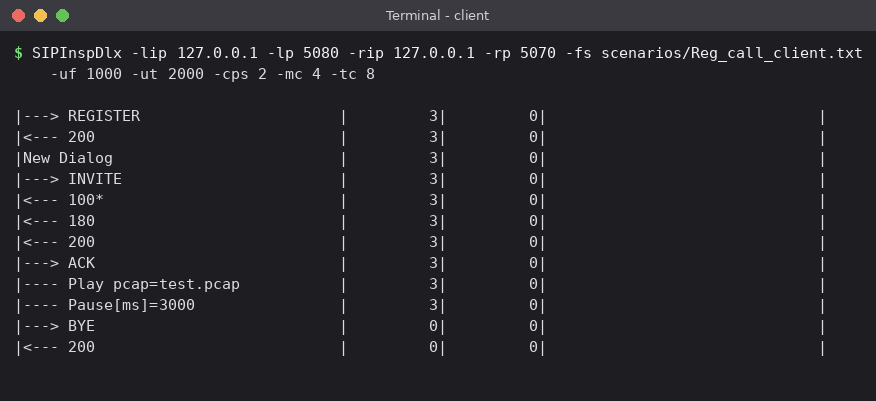
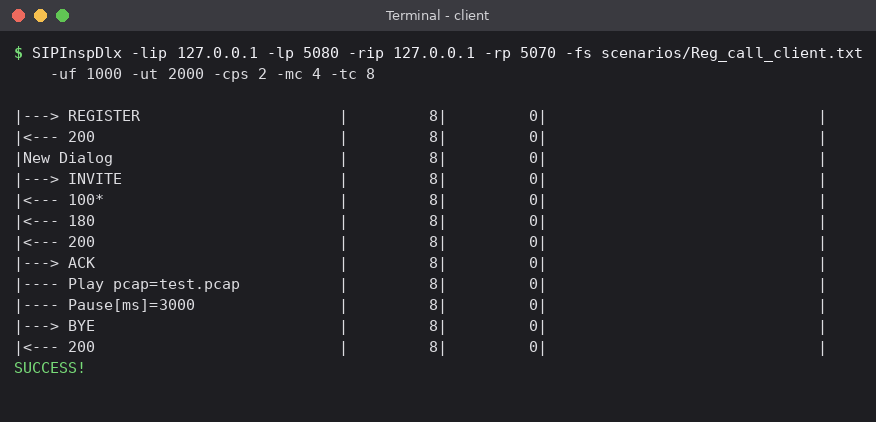
-np if it runs in the background, and then the client, as shown in the next examples.CLI progress screen on Windows
When keys and certificates are generated and while scenarios run, the screen is updated automatically. The MS-DOS console of older Windows versions does not follow the ANSI terminal standard. For the progress screen to work well there, execute the following command once. It installs the needed DLLs and makes the console interpret ANSI codes:
C:\SI\windows>.\ansicon\x64\ansicon.exe -i       // 64-bit Windows
C:\SI\windows>.\ansicon\x86\ansicon.exe -i       // 32-bit Windows
Examples
A server and a client on the same computer. The server answers the registration and the call of Reg_call_server.txt; the client plays Reg_call_client.txt. The server takes up to 20 calls, so it can serve the client; -np keeps its output quiet:
SIPInspDlx -lip 127.0.0.1 -lp 5070 -lrtp 7000 -fs scenarios/Reg_call_server.txt -mc 20 -tc 20 -np

SIPInspDlx -lip 127.0.0.1 -lp 5080 -lrtp 6000 -rip 127.0.0.1 -rp 5070 \
           -fs scenarios/Reg_call_client.txt -uf 1000 -ut 2000 -cps 2 -mc 4 -tc 8
The next command executes the scenario Reg_call_client.txt. The program binds to the local IP 192.168.1.110 and the local port 8000. Messages are sent to the remote IP 192.168.1.98 and port 60060. The From user is 6661234 and the To user 5551234. Calls are generated at 1 call per second, at most 1 call at a time, and endlessly (-tc 0), which means the scenario is executed forever:
SIPInspDlxCLI.exe -lip 192.168.1.110 -lp 8000 -rip 192.168.1.98 -rp 60060 -fs scenarios\Reg_call_client.txt -uf 6661234 -ut 5551234 -cps 1 -mc 1 -tc 0A scenario that registers many users, one for each row of a values file, 20 at a time, and logs what the program does at the DEBUG level:
SIPInspDlx -lip 10.0.0.5 -rip 10.0.0.1 -fs scenarios/Reg_series_client.txt -fv values/Reg_series_values.txt \
           -cps 20 -mc 20 -tc 100 -d DEBUG
A scenario that has the messages of several dialogs in one sequence, in the order they were captured (made with Trace to Scenario and -order capture), runs with -noCID:
SIPInspDlx -lip 192.168.1.110 -rip 192.168.1.98 -fs scenarios/trace_in_capture_order.txt -noCID -tc 1Generate RSA keys (4096 bits) and a self-signed certificate for the IP address 192.168.1.110, valid for 365 days. The files are created in the security folder:
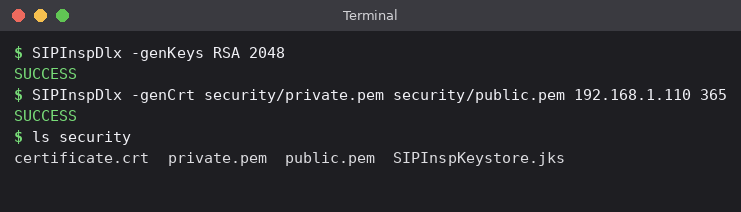
The certificate that SIP Inspector generates is put into its keystore at once. -addCrt is for a key and a certificate that were made by something else. A TLS server then starts like this:
SIPInspDlx -addCrt my_private.pem my_certificate.crt
SIPInspDlx -t TLS -lip 192.168.1.110 -lp 5061 -fs scenarios/Reg_server.txt -mc 20 -tc 0 -np