Command
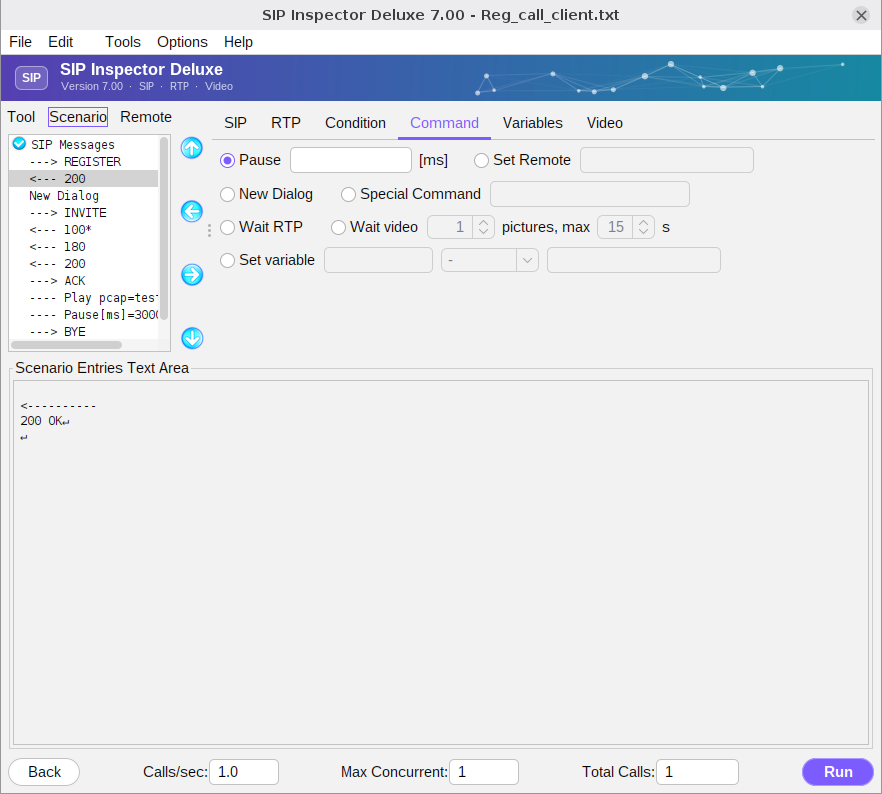
Pause - needs a number of milliseconds, or a keyword such as [$delay] that refers to a variable. It puts a pause between scenario entries. To simulate real traffic it is useful to create a variable pause: reference a variable that has a random value.
Set Remote - used when the program has to deal with strict and loose routing, or when it does call brokering between two SIP endpoints. The command sets the destination of the next SIP messages. It can be used many times in one scenario. It is needed for third party call control (3PCC). The remote target can be combined with values from a file, or can be taken from incoming messages: for loose or strict routing an address is extracted from a Record-Route header, stored in a variable and used as the target. Once a remote target is set, the keyword [remote_ip] is replaced with its address, overriding the setting of the initial screen. The value may include a port, for example 192.168.1.103:5077; without a port 5060 is used.
New Dialog - separates dialogs within the same scenario file. See Multiple dialogs in a scenario.
Special Command - a quick way to add a new command. At the moment there is one: setCC(n) sets the maximum number of concurrent calls while the scenario runs, which is how Load_gradual_increase_client.txt raises the load step by step.
Wait RTP - the scenario goes on when the first RTP packet of the other side arrives. There is no time limit. It waits for audio: video packets do not release it.
Wait video - the scenario goes on when the video of the call has been decoded into the given number of pictures. If that does not happen within the time (15 seconds by default) the call fails with ‘No video received’. The time starts when this entry starts, so after a Wait RTP it counts from the first audio packet. If video is not decoded (the Video tab's ‘Process video packets’ is not ticked, or the CLI runs without -pv) the entry does not wait. See Video.
Set variable - gives a variable a value, which the scenario uses as [$name]. The header - with an expression that starts with = sets a number or a sum, for example =500 or =[$a]+1000 (the operators are + - * /). A header such as To:, From:, Call-ID:, Contact: or startline with an expression that has a * takes that part of the header of the last message, for example tag=*. In a scenario file: set_Variable=toTag "To:" "tag=*".