Values files: one scenario, many users
A scenario describes one call. Real tests need many calls that are not the same: 500 phones that each register with their own user name and password, calls from many different numbers, a sweep over a range of ports. Writing one scenario for every user does not scale. A values file solves this: the scenario is written once with placeholders, [field0], [field1] ..., and the values file is a table with one line for every call. Each new call takes the next line and puts its values in place of the placeholders.
How it works
- The scenario uses
[field0]where the first value goes,[field1]for the second, and so on. The keywords can be anywhere in a message the program sends: the request line, any header, the body, and inside the authentication keyword. - The values file has one line for every call. The values on a line are separated with ‘;’: the first is [field0], the second [field1] ...
- Load it with File/Load Values (or
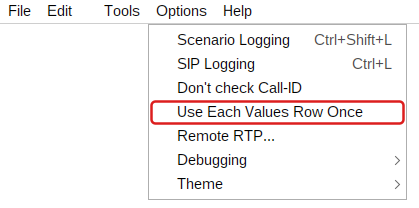
-fvon the command line) and press Run. Every new call takes the next line. When the last line is used the program starts again at the first line, unless Options/Use Each Values Row Once is on (see below).
---------->
REGISTER sip:[remote_ip] SIP/2.0
From: <sip:[field0]@[remote_ip]>;tag=...
To: <sip:[field0]@[remote_ip]>
...
Proxy-Authorization: [authentication
  username=[field1]; password=[field2];]
//[field0];[field1];[field2]
107;user107;pass107
108;user108;pass108
109;user109;pass109The scenario (left, from scenarios/Reg_series_client.txt) and its values file (right, values/Reg_series_values.txt)
| Call | Line used | [field0] | [field1] | [field2] | The REGISTER is sent for |
|---|---|---|---|---|---|
| 1 | 1 | 107 | user107 | pass107 | 107, authenticated as user107 / pass107 |
| 2 | 2 | 108 | user108 | pass108 | 108, authenticated as user108 / pass108 |
| 3 | 3 | 109 | user109 | pass109 | 109, authenticated as user109 / pass109 |
A call takes its line when it first needs a value and keeps it to the end: the INVITE, the ACK and the BYE of one call always carry the same values, even when many calls run at the same time. A call that is a whole scenario run (with New Dialog entries, several dialogs) uses one line for all its dialogs.
Step by step: register many users
The sample files register a list of users against a registrar or a proxy that asks for authentication.
- Load the scenario: File/Load Scenario,
scenarios/Reg_series_client.txt. - Load the values: File/Load Values,
values/Reg_series_values.txt. Edit it first so that it has your users and passwords, one user per line. - Turn on Options/Use Each Values Row Once: every user registers once, and the run ends after the last line. Total Calls can stay 0.
- Set Calls/sec (for example 10) and Max Concurrent (for example 50), then press Run. The progress screen counts the REGISTERs and the 200 OKs; one 200 per line means every user is registered.
The same from the command line:
SIPInspDlx -lip 10.0.0.5 -rip 10.0.0.1 -fs scenarios/Reg_series_client.txt \
           -fv values/Reg_series_values.txt -fvo -cps 10 -mc 50
Writing a values file
| Rule | Example |
|---|---|
| One line for every call; values separated with ; | 1000;secret1000;Alice |
| Lines that start with // or # are comments. Use the first line to name the columns. | //[field0];[field1];[field2] |
| A value can be empty | 1000;;Alice ([field1] is empty) |
| A ; inside a value is written \; | sip:1000@host\;transport=tcp |
| Spaces belong to the value, so do not put spaces around ; | 1000;Alice Smith |
| The file is read as UTF-8 (letters like Đ, ö, é are fine) | 2001;Đorđe |
| A value that counts: start+step (see Counting values) | 5000000+1 |
| Name the columns with a line #columns:, then [field:user] works as well as [field0] | #columns: user;password;name |
Column names. With named columns a scenario says what it means: [field:user] instead of [field0]. The numbers keep working, and names ignore case. A name that is not a column gives an empty value; when the values file is loaded and before every run the program checks the names of the scenario against the columns, and the CLI prints a warning such as the scenario uses [field:pasword], but the values file has no column pasword (its columns: number, user, password).
CSV files. A values file whose name ends with .csv is read the way spreadsheets save it: values separated with commas, the first line names the columns, and a value in double quotes may have commas, line breaks and "" for a quote. Lines that start with # are comments. A .csv file without a first line of names can have a #columns: line instead. In an XML values file the root element names the columns: <values columns="user;password">.
number,user,password,display name
2001,alice,"se,cret","Smith, Alice"
2002,bob,pw2,Bob

From: "[field:display name]" <sip:[field:number]@[remote_ip]>;tag=[call_number]
Proxy-Authorization: [authentication username=[field:user]; password=[field:password];]
Values that span several lines or contain XML are easier to write in an XML values file. Each <rowValues> is a line, each <value> a column; CDATA keeps the text exactly as written:
<values>
  <rowValues>
    <value>John</value>
    <value>Doe</value>
    <value><![CDATA[;-)]]></value>
  </rowValues>
  <rowValues>
    <value>Smiley</value>
    <value>Face</value>
    <value><![CDATA[:-)]]></value>
  </rowValues>
</values>
[field0] | [field1] | [field2] |
| John | Doe | ;-) |
| Smiley | Face | :-) |
Use each row once, or go around
By default the lines are used in turn, and after the last line the next call starts again at the first one. That is right for load tests: three accounts can make thousands of calls. Sometimes every line must be used exactly once: a list of real accounts to register or provision, numbers that must not be called twice, a list of devices to probe. Turn on Options/Use Each Values Row Once (-fvo on the command line): every line is given to one call, and after the last line the program makes no more calls. The run ends when those calls end, also when Total Calls is 0 (endless).
| Values file | Total Calls | Use Each Values Row Once | What happens |
|---|---|---|---|
| 3 lines | 8 | off | 8 calls with lines 1, 2, 3, 1, 2, 3, 1, 2 |
| 3 lines | 0 (endless) | off | Calls without end, lines 1, 2, 3, 1, 2, 3 ... |
| 3 lines | 0 (endless) | on | 3 calls, one per line, then the run is done |
| 3 lines | 8 | on | 3 calls: the lines end first |
| 3 lines | 2 | on | 2 calls (lines 1 and 2): Total Calls ends first |
- The option is for the program as a client (it makes the calls). When the program is a server, an incoming call takes the next line; once every line is used the next calls get empty values, and SIPInspector.log says so.
- The option applies only when the scenario uses [fieldN] keywords; a scenario without them is not limited.
- Start on the progress screen begins again at the first line. The option is not kept after the program is closed, so a later test is never limited by surprise.
Counting values
A value written as start+step changes every time its line is used again, so one line can stand for thousands of different numbers. With the line below the first call uses [field0] = 5000000 and [field1] = 1, the second call 5000001 and 2, and so on:
5000000+1;1+1| Written | Gives | Use |
|---|---|---|
5000000+1 | 5000000, 5000001, 5000002 ... | a different caller number for every call |
0099+1 | 0099, 0100, 0101 ... (leading zeros kept) | extensions or IDs of a fixed width |
{100-5} | 100, 95, 90 ... | counting down: write the value in braces |
555-1234, +14155551234 | always as written | phone numbers, dates and other text do not count |
Counting continues across rounds. With two lines, a;1+1 and b;1+1, the calls get a1, b1, a2, b2, a3 ... Example: values/Port_scan_values.txt has the single line 100;10024+1;: every call goes to the next port (10024, 10025, ...) of the address ending in .100, a port sweep with a one-line file.
Ready-made examples
| Scenario | Values file | What it does |
|---|---|---|
Reg_series_client.txt | Reg_series_values.txt | Registers a list of users with authentication: [field0] user, [field1] and [field2] authentication user and password. |
PBX_call_series_client.txt | PBX_call_series_values.txt | Calls from many users to many numbers: [field0] caller, [field1] called number, [field2] and [field3] authentication. |
Port_scan_client.txt | Port_scan_values.txt | Sends a REGISTER to a range of addresses and ports ([field0] last number of the address, [field1] the port). |
any | values_incremental.txt | Two counting values: 5000000+1 and 1+1. |
any | xmlValues.xml | An XML values file with a long XML body as a value. |
The scenarios are in the folder scenarios, the values files in values.
When the values are not what you expect
| What you see | Why, and what to do |
|---|---|
| An empty value where [field1] should be | The line has fewer values than the scenario uses, or no values file is loaded. SIPInspector.log has a warning that names the keyword. Check the number of ; on the line and File/Load Values. |
| All calls use the first line | The program was started again between the calls, or every run makes one call. Lines move forward with every call of one run. |
| Changes to the values file are not used | Press Start again: the file is read again when it was changed since the last run. |
| A number changes from call to call | It is written start+step (digits, +, digits). Write it differently, or it is meant as a counter. |
| Fewer calls than lines | Total Calls is lower than the number of lines, or the run was stopped. With Use Each Values Row Once set Total Calls to 0. |