RTP
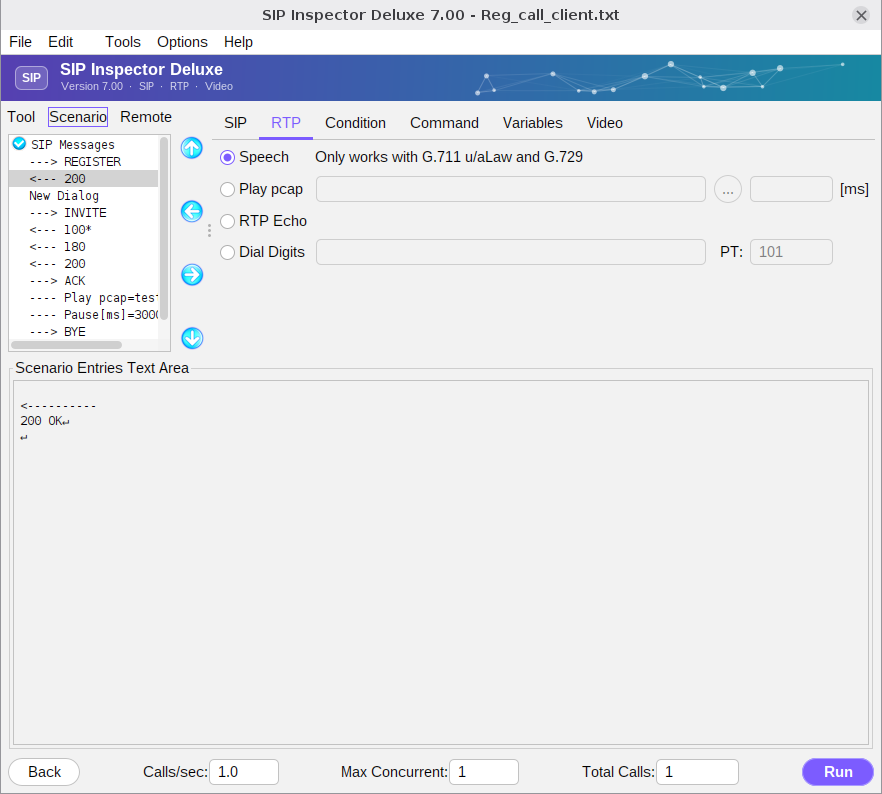
RTP can be played from a saved pcap file, can be live two-way speech, or incoming RTP can be echoed back to the sender. There is also an option to send out-of-band DTMF digits. Only a scenario with live speech can insert digits. Speech works with G.711 u-law and a-law and with G.729. Play pcap takes the file and, in the field after it, how long to play it in ms. RTP Echo sends back what arrives. Dial Digits sends the digits with a payload type (PT). The PT for telephone events is obtained from the incoming SDP. The PT field starts with 101; a value in it forces that payload type, and if the field is left empty digits are sent with payload type 99.
A scenario that plays RTP must keep the call open while the RTP plays. The first scenario below does not produce any audio: as soon as RTP is started BYE is sent, and the end of the call stops the RTP. The second scenario is the proper way: a pause right after ‘Play pcap’ gives the duration. The third echoes the RTP of the other side:
---> INVITE
<--- 100*
<--- 180
<--- 200
---> ACK
---- Play pcap=test.pcap
---> BYE
<--- 200
---> INVITE
<--- 100*
<--- 180
<--- 200
---> ACK
---- Play pcap=test.pcap
---- Pause[ms]=15000
---> BYE
<--- 200<--- INVITE
---> 100
---> 180
---> 200
<--- ACK
---- RTP Echo
<--- BYE
---> 200Sometimes a captured pcap file is shorter than the time during which it has to play. That is not a problem: the next example plays a pcap file for 60 seconds and starts over every time the end of the file is reached.
---- Play pcap=test.pcap
---- Pause[ms]=60000
If the file has 45 seconds of audio and only the first 15 seconds must play, use a duration. The audio plays for 15 seconds and nothing is sent in the next 45; when the pause expires the scenario goes on:
---- Play pcap=test.pcap;duration=15000
---- Pause[ms]=60000
Several pcap files can be played at the same time, for example three different codecs sent in parallel for 15 seconds. A series of short files plays digits in the middle of speech:
---> ACK
---- Play pcap=test.pcap
---- Play pcap=711aLaw.pcap
---- Play pcap=G729.pcap
---- Pause[ms]=15000
---> BYE
---> ACK
---- Play pcap=test.pcap;duration=5000
---- Pause[ms]=5000
---- Play pcap=dtmf_1.pcap;duration=200
---- Pause[ms]=200
---- Play pcap=dtmf_2.pcap;duration=200
---- Pause[ms]=200
---- Play pcap=test.pcap
---- Pause[ms]=10000
---> BYESRTP
SRTP, secure RTP, is seamlessly integrated. Define a scenario like for any other call and indicate in the SDP that SRTP is used: the media line uses RTP/SAVP and has a crypto line with the cipher suite and the keying material. The supported suites are AES_CM_128_HMAC_SHA1_80 and AES_CM_128_HMAC_SHA1_32. For an incoming call:
<--- INVITE
---> 100
---> 180
---> 200
<--- ACK
---- Play pcap=test.pcap
<--- BYE
---> 200
The SDP of the 200 OK must look similar to this:
v=0
o=111 843670094 843670094 IN [IP_ver] [local_ip_sdp]
s=-
c=IN [IP_ver] [local_ip_sdp]
t=0 0
a=sendrecv
m=audio [media_port] RTP/SAVP 0 101
a=crypto:1 AES_CM_128_HMAC_SHA1_80 inline:LXr6FMnrukKNw8ZqISVKBk9y8g3/wc37L6le/gWQ
a=rtpmap:0 PCMU/8000
a=rtpmap:101 telephone-event/8000
a=fmtp:101 0-15
a=ptime:20
When such a call is established SIP Inspector uses the key that the remote party advertised to decrypt its RTP, and uses its own key to encrypt the RTP it sends, whether the content comes from a pcap file or from live speech. For an outgoing call the logic is the same, but the SRTP information goes into the SDP of the INVITE. The scenarios SRTP_reg_incoming_call_client.txt and SRTP_reg_outgoing_call_client.txt are complete examples.