Buying the license
SIP Inspector Pro is paid-for software. To use it a license must be bought to acquire a serial number that unlocks the program. Serial numbers can be purchased through the web site. When buying a license please make sure to include your Machine-ID. The Machine-ID is reported by the program. Please copy and paste the value rather than typing it in. Version 7 uses a new serial number scheme: request a serial number for version 7 with your Machine-ID.
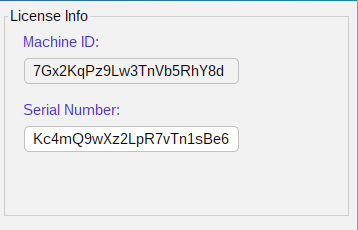
The Machine-ID is calculated from the computer: its network adapters and its operating system installation. Version 7 keeps it stable when network adapters are added or removed, so a license does not stop working because of a new Wi-Fi or USB network adapter. A new installation of the operating system, or another computer or virtual machine, has another Machine-ID and needs a serial number of its own. A serial number of an earlier release that does not yet include the operating system installation is refused; the program then shows the Machine-ID to send for a new one.
Use the command line to get the Machine-ID and to enter the serial number:
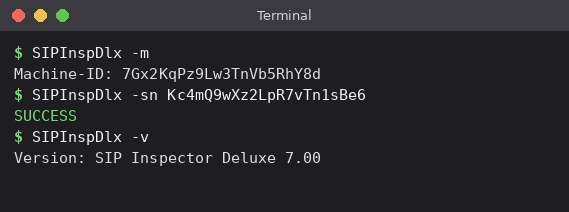
Windows examples:
C:\SI\windows>SIPInspDlxCLI.exe -m
Machine-ID: 7Gx2KqPz9Lw3TnVb5RhY8d

C:\SI\windows>SIPInspDlxCLI.exe -sn Kc4mQ9wXz2LpR7vTn1sBe6
SUCCESS