Condition and branching
Conditions and branching are important to control the execution of a scenario. In some cases the course of the execution differs depending on which message is received, on the value of a variable or on the number of calls generated so far.
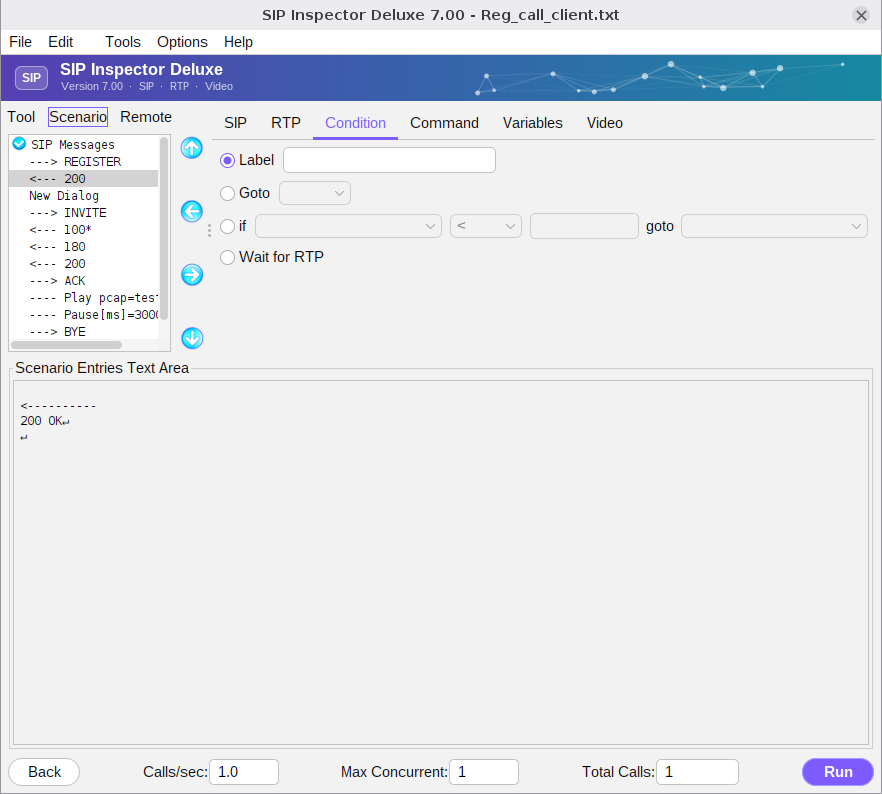
There are 3 subcategories: label, goto and if. A label is a marker in the scenario; its name can be any text, and it is used together with ‘goto’ and ‘if’. When goto is selected the tool lists the available labels; pick one and create the entry (the label must already exist). With if the tool enables the fields of a condition: the first is a drop-down list of the variables, the second the relational operator, the third the value to compare with, and the fourth the label to jump to when the condition is true. There are two predefined choices, REQ and Resp, for decisions that depend on the message that came in, for example whether it is a CANCEL request or a 488 response. Wait for RTP is the same as the command of the Command tab.
The example processes incoming calls of all users except user 1000. The variable ‘user’ gets the user name from the From header with a star pattern. If the call comes from 1000 the tool does not answer it, and the scenario goes to its end:
<--- INVITE
---- set user=("From","<sip:*@")
---- if (user == 1000) goto end
---> 100
---> 180
---> 200
<--- ACK
---- Pause[ms]=15000
<--- BYE
---> 200
end:
The course can also depend on the response of the server. Here a client registers: if it gets 404 the scenario ends, 407 makes it send a REGISTER with digest authentication, and 200 completes the registration:
---> REGISTER
---- if (Resp == 404) goto end
<--- 100*
<--- 407*
---> REGISTER*
<--- 200
end:
Look at the scenarios in the ‘scenarios’ folder for more examples, for instance Reg_branching_client.txt.