Scenario files, loading and saving
Scenarios can be built in the tabs, as explained above, or they can be loaded from a file. It is wise to save a working scenario in the scenarios folder (File/Save Scenario) and to load it later (File/Load Scenario). The same file runs in the GUI and in the CLI.
A scenario file is plain text. Everything before the first line that contains ---------- is a comment, and lines that start with // are comments anywhere. Each entry starts with a line of dashes: ----------> is a message the program sends, <---------- a message it expects (with a * after it, an optional one), and ---------- alone starts any other entry. The entries of the Command, Condition, RTP and Variables tabs look like this in a file:
| In the file | Entry |
|---|---|
cmd_Pause=2000 | Pause for 2000 ms. A keyword such as [$delay] can be used instead of the number. |
cmd_PlayPcap=./pcap/test.pcap;duration=15000;video=true | Play a pcap file (or MP4 file) as RTP; duration and video are optional. |
cmd_RTPSpeech | Live speech (RTP Speech). |
cmd_RTPEcho | Echo the incoming RTP (RTP Echo). |
cmd_DialDigits=1234;PT=101 | Send DTMF digits. |
cmd_setRemote=192.168.1.110:5060 | Send the next messages to this address (Set Remote). |
cmd_NewDialog | The messages that follow are a new dialog (New Dialog). |
cmd_Spec=setCC(10) | Special command: set the maximum number of concurrent calls. |
waitRTP | Wait for the first RTP packet. |
waitVideo=30;timeout=15000 | Wait for 30 decoded pictures, at most 15000 ms. |
set_Variable=toTag "To:" "tag=*" | Variable assignment: name, header, expression. |
rndVal=rand[1000000-9999999] | A random value in a range (RandVar). |
label=start / goto=start | A label and an unconditional jump. |
condition=if (Resp == 404) goto end | A conditional jump. |
assert=status 2xx | Pass or fail: the last response is a 2xx. See Assertions and run reports. |
assert=rtp loss <= 1 | Pass or fail: at most 1% of the RTP that came in was lost. |
Scenario comments are kept when a scenario is edited and saved. All scenarios that come with the program start with a comment that says what the scenario does, which scenario is its counterpart and what messages it exchanges. Read them: they are the shortest documentation of the sample scenarios.
Assertions and run reports
A scenario that only sends and waits shows that the other side answered. An assertion checks that it answered well: the code of the response, how fast it came, a header, the SDP, the quality of the RTP. It is a scenario entry like any other (Condition tab, Assert), placed after the message it checks. When it holds, the scenario goes on. When it does not, the step counts as unexpected with the reason (it shows in the progress table and in the reports), the call is dropped and the CLI ends with exit code 1. An assertion that cannot be read fails too, so a typing mistake cannot make a test pass.
| In the file | Passes when |
|---|---|
assert=status 200 | The last response is a 200. A class (2xx) or several codes (180|183) can be given. |
assert=responseTime 500 | The last response came at most 500 ms after the last request that was sent. |
assert=header Contact exists | The last message has the header (absent: it does not). The short names (m, i, f, t, v ...) count too. |
assert=header User-Agent contains Fortinet | A value of the header contains the text (equals: is it; matches: the regular expression is found in it). Case is ignored. |
assert=body contains PCMU | The body (SDP) of the last message contains the text; also matches, empty and notEmpty. |
assert=rtp packets > 100 | The call received more than 100 RTP packets so far. |
assert=rtp loss <= 1 | At most 1% of the RTP packets were lost (from the RTP sequence numbers). |
assert=rtp jitter < 30 | The interarrival jitter (RFC 3550) is below 30 ms. |
assert=rtp mos >= 3.8 | The estimated MOS is at least 3.8. |
The RTP numbers are those of the call so far, so put an RTP assertion after a pause that lets the media run, for example just before the BYE. The MOS is an estimate from the loss and the jitter (the simplified E-model of ITU-T G.107 for G.711); it does not know the delay of the network. scenarios/Call_speech_dials_asserts_client.txt is an example.
Run reports. The numbers of a run are collected for every call: INVITE attempts and answered calls (ASR, the answer-seizure ratio), how long the answered calls lasted (ACD, the average call duration, up to the BYE), the final responses, the time from each request to its final response (min, average, p50, p95, p99, max) and the RTP that came in (packets, loss, jitter, MOS). In the CLI they are printed at the end and written with -junit, -report and -html. In the GUI the Report... button of the scenario screen saves them as HTML, CSV or JUnit XML (by the name of the file), and its tooltip shows the numbers of the run so far. The chapter Run reports shows each format with a sample.
Batch scenario processing
SIP Inspector Pro can load several scenario files at the same time (select more than one file in File/Load Scenario). The tool sorts them and runs them alphabetically, one by one; keep that in mind, as the order differs from the order in which you selected the files. As each scenario finishes, the summary of its progress is saved in a file.
Validating a scenario
A scenario written by hand or edited over time can have small mistakes that the other side rejects: a missing header, a From without a tag, a CSeq with the wrong method. Tools/Validate Scenario checks the SIP messages of the loaded scenario and reports what it finds. The checks are advisory: the scenario can still be run.
- Required headers - every complete SIP message has Via, From, To, Call-ID and CSeq.
- Tags - the From header has a tag; a response (except 100 Trying) and a request inside an established dialog have a tag in the To header.
- CSeq - a number lower than 231 followed by a method, and in a request the method is the same as the method of the request line.
- Call-ID - all the messages of a dialog have the same Call-ID (the dialogs are separated by New Dialog entries).
- Max-Forwards - a request that the scenario sends has one.
- SDP - the SDP of a message that the scenario sends follows RFC 4566: the lines, their order, c= for every stream, an a=rtpmap for every dynamic payload type, a=crypto only with RTP/SAVP. Keywords get values of their kind for the check ([IP_ver] IP4, an address, a port); an SDP that is a variable ([$sdp1]) is checked when the message is sent. See SIP and SDP checks.
Headers that are keywords, for example tag=[call_number] or CSeq: [cseq+1] INVITE, get their value when the message is sent, so they are not checked. Entries that only name a method or a status code (‘<--- 200’) are not checked either, and the headers that an outgoing response copies from the received request ([last_Via:], [last_To:] ...) count as present.
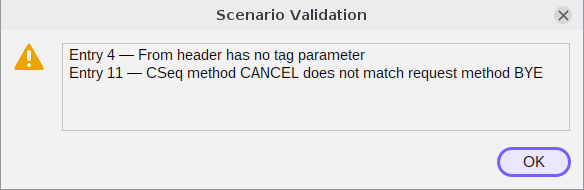
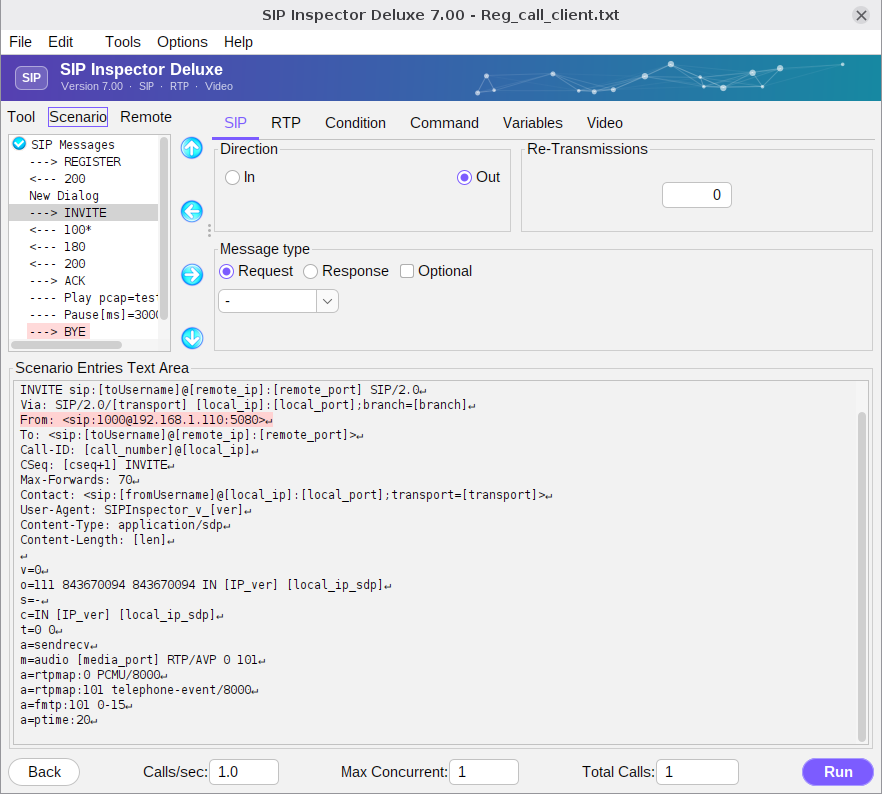
The entries with findings are marked red in the message tree. Select one and the header line in question is highlighted in the Scenario Entries Text Area. When nothing is found the program says ‘No likely SIP compliance issues found.’ The marks are cleared as soon as the scenario is changed; run the validation again after fixing it.