SIP load testing and stress testing
Generate SIP calls with real RTP at hundreds of calls per second, steer the load while it runs, and let the numbers (ASR, response times, MOS) decide whether your PBX, SBC or SIP proxy passed.
Load from the scenario you already have
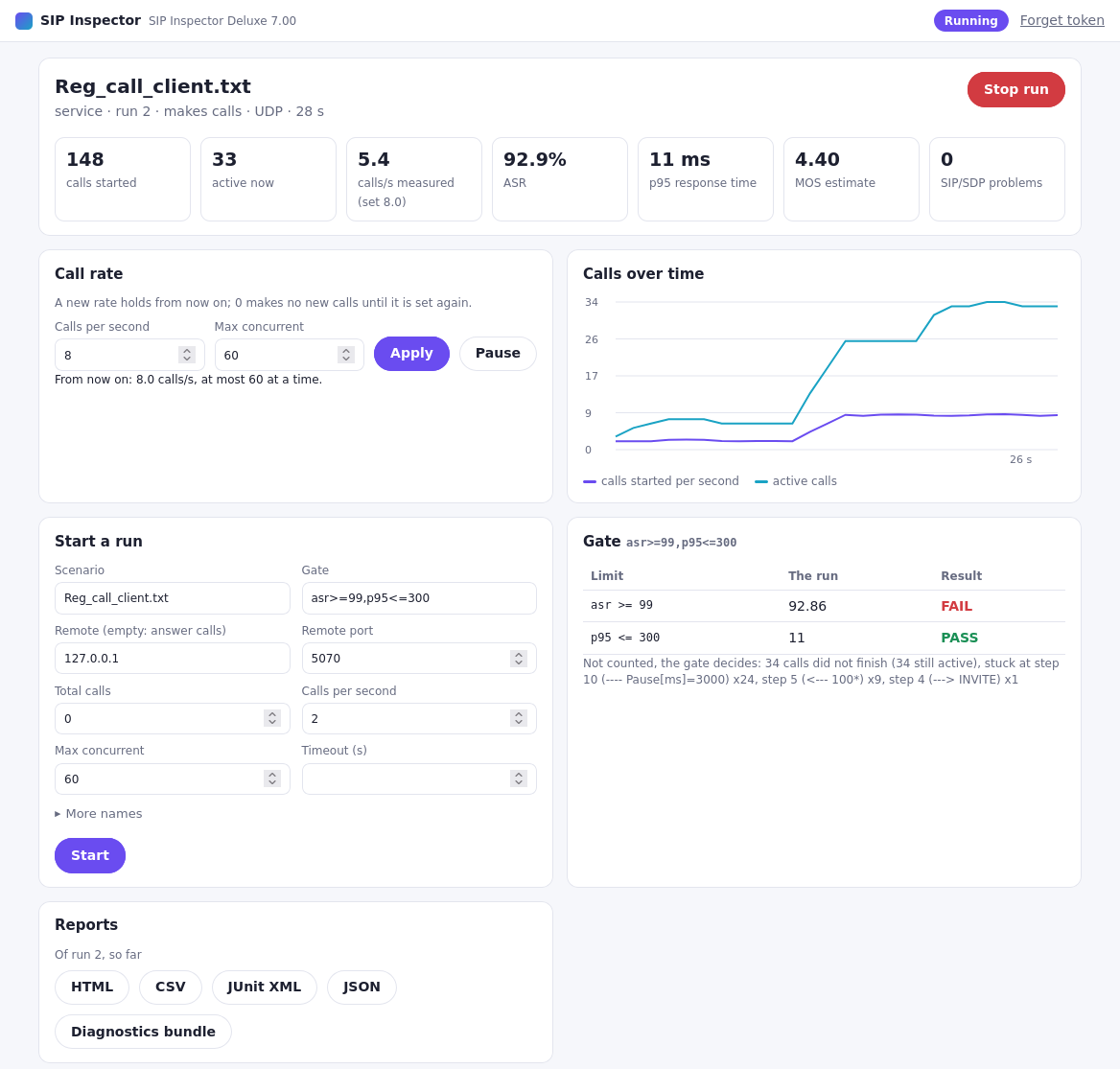
The scenario you built and tried with one call in the GUI is the load test. Set the calls per second, the maximum of concurrent calls and the total, and run it from the GUI, the command line or a REST call.
- Calls per second, concurrent calls and total calls, for SIP over UDP, TCP, TLS, WebSocket and secure WebSocket
- Built for 300+ calls per second and 300+ simultaneous RTP streams (version 6 and later)
- Every call its own user and password from a values file (CSV): register thousands of users
- A gradual increase of concurrent calls, as a ready sample scenario
- Real media: RTP from pcap files with any recorded codec, SRTP, H.264 video
./SIPInspDlx -lip 10.0.0.5 -rip 10.0.0.9 -fs scenarios/Reg_call_client.txt \
    -cps 50 -mc 500 -tc 0 -to 600 -np -api 8080 \
    -gate asr>=99.5,p95<=500,mos>=4.0,loss<=0.5 \
    -html load.html -junit load.xml -json load.json
Watch and change the load while it runs
-apiopens a REST API and a control page in the browser: calls started and active, the measured rate, ASR, p95 and MOS, livePUT /rateraises or lowers the call rate without starting againGET /metrics?format=prometheusfor Prometheus and Grafana dashboards- Service mode: start one test after another over REST from your own tools
The numbers decide
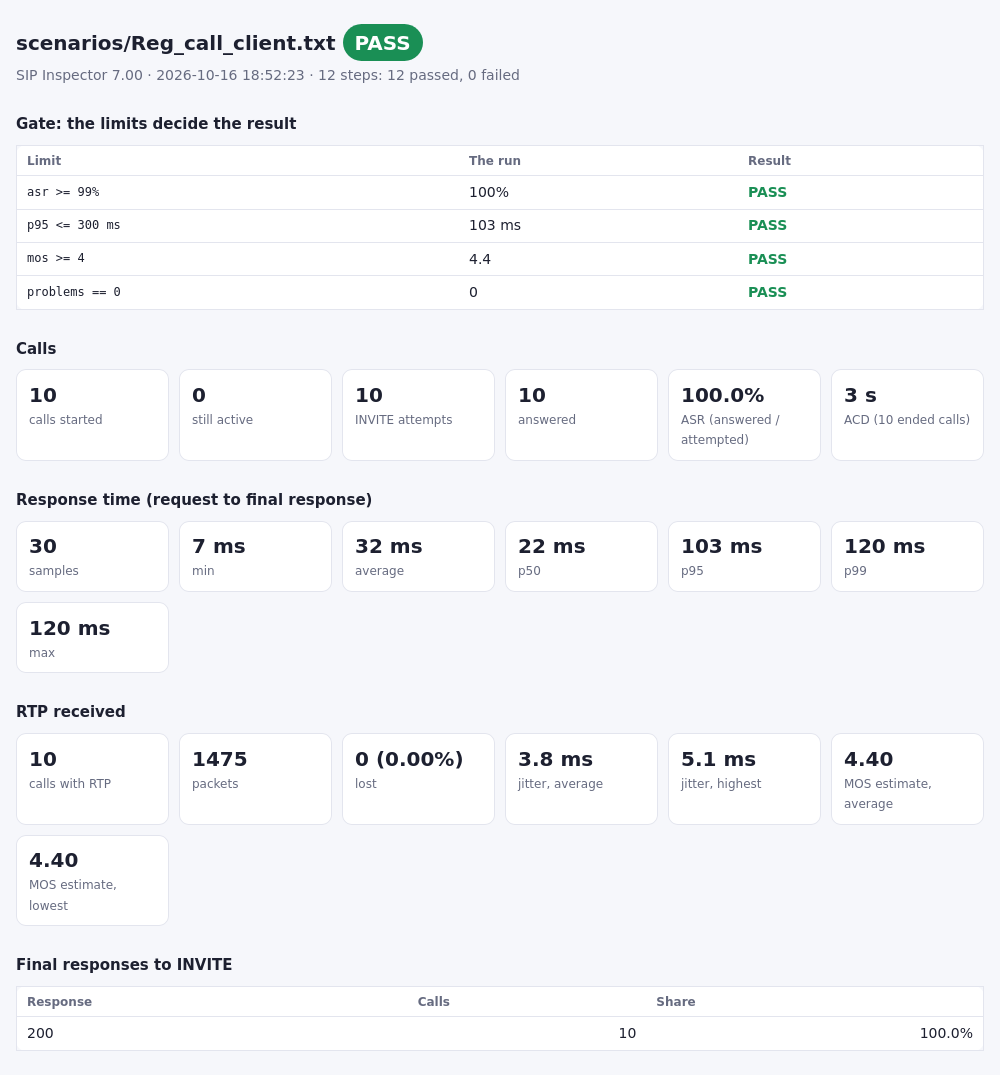
In a load test a few failed calls are normal; what counts is the whole run. A gate sets limits on its numbers, and only the limits decide the result and the exit code.
- ASR and ACD, final responses, calls that did not finish
- Response times: p50, p95, p99 and max
- RTP: packets, loss, jitter, estimated MOS
- SIP/SDP problems in the messages (
problems==0) - HTML, CSV, JUnit XML and JSON reports, with the call flow of the first failed call
Measure what your systems can carry
The manual describes a capacity test between two computers: the call rate (or the number of calls with audio) goes up step by step, a minute per step, until a step breaks its limits.
ASR
At least 99.5 % of the attempted calls answered.
Response time
95 % of the SIP requests answered within 500 ms.
RTP loss
At most 0.5 % of the RTP packets missing.
Voice quality
Estimated MOS of at least 4.0.
Questions
Can SIP Inspector do SIP load testing?
Yes. A scenario runs at a set number of calls per second, with a limit of concurrent calls and a total number of calls. Version 6 and later were improved for call rates of 300+ calls per second and 300+ simultaneous RTP streams; what a computer reaches depends on its processor and network, and the manual describes how to measure it.
Does a load test send real RTP media?
Yes. Every call can play RTP from a pcap file (any codec that was recorded), also as SRTP, and the RTP that comes back is measured: packets, loss, jitter and an estimated MOS. RTP from pcap files is spread over several CPU cores.
How does a load test pass or fail in a CI pipeline?
With a gate: limits such as asr>=99, p95<=300 or mos>=4 decide the result and the exit code of the command line (0 passed, 1 failed). The JUnit XML report shows every limit as a test case for Jenkins, GitLab or GitHub Actions.
Can I change the call rate while the test runs?
Yes. A run started with -api opens a REST API: PUT /rate sets a new call rate, and the browser control page has a field for it. GET /metrics gives the numbers of the run, also for Prometheus and Grafana.
How is it different from SIPp for load testing?
SIPp is free and fast, with XML scenarios and the command line only. SIP Inspector builds the scenario in a GUI and runs the same file unattended, changes the rate over REST while it runs, and writes HTML, CSV, JUnit XML and JSON reports with ASR, response times and MOS. It runs natively on Windows, Linux and macOS.
Try it on your own system
Click through a call in the live demo, or download SIP Inspector and point it at your PBX, SBC or proxy.